Welcome to the wheelofnames.com FAQ!
Wheel of Names is a free, easy to use, and highly customizable website that you can use to pick a random item from a list. It is used by teachers and for raffles. Enter names, and spin the wheel to pick a random winner. You can customize the look and feel, and save and share your wheels with others.
If you have a specific question, try looking at the table of contents or using your browser's search function to find the answer. You can also find user reviews and tutorials here.
Randomness
Is Wheel of Names truly random?
Yes, by default the spinner is completely unbiased. We are so confident in the code that we built a verification tool to let you test it yourself. You can run 10,000 spins in seconds to gather statistical evidence of its random distribution.
How we guarantee randomness
To ensure genuinely unpredictable results, this site does not use the standard Math.random() function. Instead, the wheel’s physics are driven by the crypto.getRandomValues() function, a specialized, high-security API standard built into modern web browsers. It draws from your operating system’s cryptographically secure random number generator (CSPRNG), which is designed to be unpredictable.
This secure random number isn’t just used to pick a winner from a list. It’s used within the physics simulation of the wheel, ensuring the outcome is genuinely random and impossible to predict.
How come I got the same result twice?
This is a great question, and it’s actually a normal part of true randomness. Think of it like flipping a fair coin. It’s entirely possible to get “Heads” three times in a row. Each spin of the wheel is a completely new, independent event. Past results have zero influence on the next outcome.
If you want to make sure that a winner doesn’t get picked again, remove the winner after each spin by clicking the Remove button.
But I spun the wheel several times and one entry came up more often than the others!
The wheel doesn’t have memory, so past outcomes do not affect future results. In this way it works like a coin toss. If you toss a coin ten times, there is no guarantee that you will get exactly five heads and five tails. As a matter of fact, there is only a 24.6% chance that you will get that outcome.
If you spin the wheel several times, duplicate results are more common than your intuition might tell you. If you have 10 entries on a wheel and spin it 5 times, there is a 69.8% chance that at least one entry will come up more than once.
Is the Shuffle button really random?
Yes, the shuffle is random. It uses the Durstenfeld algorithm, a computer-optimized variant of the Fisher-Yates shuffle.
Because the shuffle is random, there is no guarantee that all items move. For example, if you have 5 items in the textbox and you shuffle them, 20% of the time the first item will remain in first place. The same would be true if you manually shuffled a deck of five cards in a truly random way.
For that same reason, shuffling more than once does not increase the randomness of the shuffle, and since the wheel itself is random, shuffling the entries before spinning does not increase or decrease the randomness of the spin. But shuffling is fun, so go ahead and shuffle as much as you like!
Can the Wheel of Names spinner be rigged?
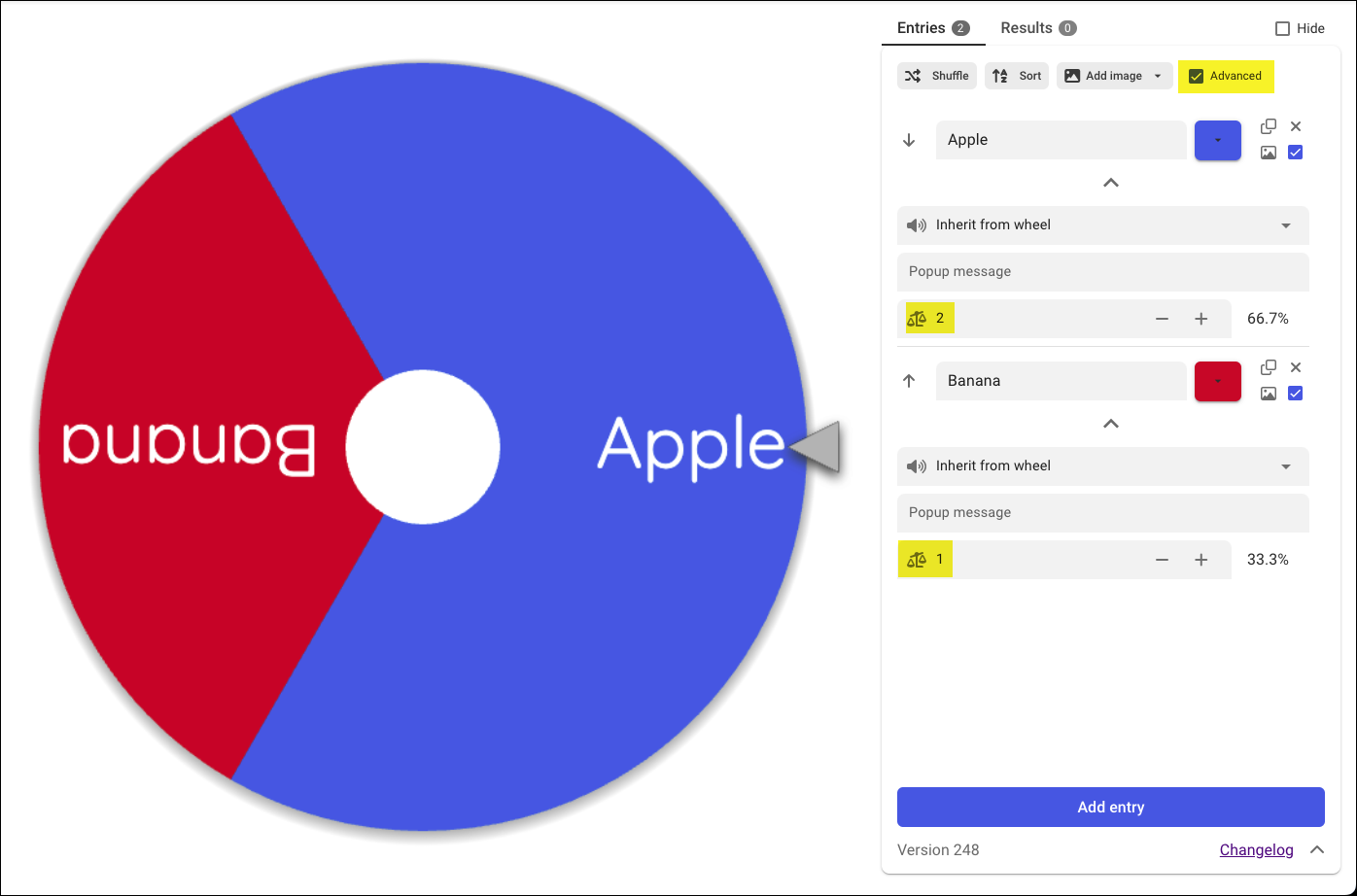
No, the spinner cannot be rigged or secretly manipulated. However, you can customize the mathematical probability of entries winning by using the official Advanced weighted mode (check the Advanced checkbox). The more weight an entry has, the larger it is on the wheel, and the more likely it is to win. For example, if you’d like “Apple” to win twice as often as “Banana”, give “Apple” a weight of 2, and “Banana” a weight of 1.
How to
How can I install Wheel of Names as an app on my phone?
Android phones:
- Open the Chrome browser and go to wheelofnames.com.
- Tap the three dots in the upper right-hand corner of the browser.
- Tap “Add to Home screen”. You may need to scroll down to find this option.
iPhones:
- Open the Safari browser and go to wheelofnames.com.
- Tap the Share icon at the bottom of Safari. It looks like a square with an arrow pointing out of it.
- Scroll down the list of options, then tap “Add to Home Screen”.
- If you don’t see “Add to Home Screen”, you can still add it. Scroll down to the bottom of the list, tap “Edit Actions”, then tap “Add to Home Screen”.
If that doesn’t work for you, go to the Apple Support Guide for adding websites to the Home Screen and scroll down to the section titled “Add a website to your Home Screen.”
How can I raffle off a prize among people who fill out my survey?
Create your survey in Google Forms. Include one question where you ask the attendee to identify themselves, for example by first name and last name initial. Click Responses and then click the green spreadsheet icon. This creates a new spreadsheet where all responses will be recorded. Share the link to your form among your attendees. Form links are long, so you may want to use a URL shortener, like bit.ly, to create a link that users can enter by hand.
Once your attendees start submitting the form, go to wheelofnames.com and click “More” then “Import Google Spreadsheet”. After logging in you will be able to pick which of your Google spreadsheets to read data from, and which tab and column in that spreadsheet. The wheel and the spreadsheet are now linked, and as new form submissions are made, they will appear in the wheel automatically. If you remove a winner from the wheel, the link to the spreadsheet is broken and it won’t be automatically updated if the spreadsheet changes.
How can I display more than one wheel at the same time?
You can add more wheels to the page with the “Add wheel” button below the textbox! Once you’ve entered multi-wheel mode, you can use the tabs above the textbox to change which wheel you’re editing. You can use all the normal functions of the editor, like modifying the entries in the textbox, shuffling and sorting entries, adding images, and even customizing your wheels individually.
Once you’re happy with your wheels, you can use the “Spin all wheels” button below the textbox, or click on your wheels individually to spin them.
If you want to add wheels you’ve previously saved, rather than starting each wheel from the defaults, you can even use the dropdown attached to the “Add wheel” button to open a wheel from the cloud or from a local .wheel file. The “Open” button in the toolbar will also allow adding wheels if you’re already in multi-wheel mode.
Some functions in the Customize dialog work slightly differently in multi-wheel mode, like only the sounds from the first wheel will be played, and the page background color is also decided by the first wheel.
How can I use the wheel in the classroom?
You can find ideas, tips, and tricks for using the wheel in the classroom classroom name picker guide.
How can I move all my wheels to a new account?
You can move all your wheels to a new account by using the account migration tool. This will move all your wheels to the new account and delete the old account.
Features and Customization
What features does the wheel have?
We aim to provide the most flexible and easy-to-use wheel spinner on the web. All our premium features are 100% free, without any paywalls. Here are some of our main features:
- Rich audio library: Choose from 150+ music tracks and sound effects to set the mood, whether you need high-octane suspense or a professional, polished atmosphere. All fully licensed so you can use them in any setting.
- Multi-wheel management: Handle multiple wheels on the same page, allowing for complex raffles or multi-stage games in a single session.
- Weighted wheels: Use weights for entries to optionally set the size of each segment, making some outcomes more likely than others.
- Instant sharing: Once you’ve built your wheel, generate a short link to share it with your audience.
- Your own visuals: Make the wheel your own by adding a custom wheel center logo, choosing your wheel background image, or adjusting the color theme to match your brand or event.
- Millions of images: Upload your own photos or search the integrated Unsplash gallery of millions of high-resolution images to find the perfect look for your wheel.
- Privacy-first storage: Save wheels to the cloud for easy access from any device, or save them locally on your machine for maximum privacy and offline control.
- Authentic physics: We don’t use simple random math scripts. Instead, our wheel mimics the feel of a physical spinning wheel for an authentic, professional, and statistically random result.
- Built for large groups: Need to spin for thousands of names? Our wheel handles massive lists without slowing down, keeping every result 100% random. Plus, you can import your data instantly from Google Sheets.
Can I change how long the wheel spins?
Yes. Click “Customize”, then the “During spin” tab, and a dialog box will come up where you can set the spin time.
Can I change the text in the winner pop-up window?
Yes. Click “Customize”, then the “After spin” tab, and a dialog box will come up where you can set what the message in this pop-up will be.
How many entries can I put on the wheel?
The wheel can display up to 1000 names at one time. We added this limit, as the names become too small to read if more are displayed. If you enter more than 1000 names in the text box, new names are randomly picked from the text box and put on the wheel as it spins. The result is that all names in the text box have the same chance of winning, even if only 1000 are displayed on the wheel at any one time.
Also, note that if you want to put thousands of names on the wheel, importing them from a Google Sheet (click More, then Import Google Spreadsheet) is faster than pasting them into the textbox. But both approaches work.
Can I turn off the sound effects?
Yes. Click “Customize” and a dialog box will appear where you can turn on or off the ticking sound made by the wheel, as well as the cheers sound effect played when the wheel stops.
Can I change the sound effects or music to my own?
Sorry, the app does not support this. You can of course play music from another app or web page while you spin the wheel.
Saving
How can I save my wheel for next time?
Your wheel’s entries and customization are saved on your device automatically after every change. When you reopen the web page on the same device, the wheel you last used are loaded again.
To make sure you don’t lose your wheels, or to be able to switch between different wheels, click “Save” and give your wheel a name. You will then be able to open your wheel again by clicking “Open” and selecting the wheel you want to use.
Is it better to save wheels in the cloud or locally?
When you click “Save” at the top of the page, you may be asked if you want to save your wheel in the cloud or to a local file. Here is a comparison to help you choose:
| Feature | Saving to the Cloud | Saving to a Local File |
|---|---|---|
| Access | Open saved wheels from other phones and computers. | Accessible on other devices after manually transferring the file. |
| Backups | Protected by nightly cloud database backups. | No automated backups. You must manage copies yourself. |
| Privacy | Stored securely in Firestore database (US datacenters). | Content never leaves your phone or computer. |
| Offline Mode | Requires an active internet connection. | You can use the wheel offline by loading your .wheel file. |
| Large Wheels | Limited size if the wheel contains many images. | Typically supports larger files, subject to device and file-system limits. |
| Control | Managed in the cloud via your account login. | Saved as a regular file you can copy, edit, or delete. |
Does my saved wheel update automatically?
No, your saved wheel does not update automatically. If you make changes to your wheel and want to save them, you will need to click “Save” again.
Can I access my saved wheels from multiple devices?
Yes. If you saved your wheels to the cloud, you can access them on any device by logging in. If you saved them as local files, you can access them on other devices by manually transferring the file (such as via email or USB).
Why do I have to log in again every time I want to open a saved wheel?
If you are using an iOS device, you may have turned on Private Browsing. Doing so tells your device to clear its memory between sessions, including login state. To avoid having to log in at the beginning of every session, you may want to turn off Private Browsing.
Sharing
How can I share a wheel I made?
Click “Share” and a link is created. You can use email, social media, etc to share that link. Anyone who uses the link will see the wheel just the way it looks to you, including entries, colors, and sound settings.
Why doesn’t my shared wheel update when I change it?
The link you share is a snapshot of the wheel at the time you clicked the share button. If you want to make changes to your shared wheel, you must click the “Share” button again to update the wheel.
Can I share a wheel without using the website?
Yes, there are 2 ways to do this:
- Create a wheel link where the customization is in the URL, detailed in the next question.
- Use the API to create a wheel and share it programmatically.
Can I share a wheel with entries that I set on the fly?
Yes, you can create a wheel link where the customization is in the URL. This allows you to share a wheel with specific entries, colors, and more. For example:
- wheelofnames.com/view?entries=Apple,Banana,Cherry&colors=FF0000,FFFF00,00FF00
- wheelofnames.com/view?entries=Yes,No&title=Yes+or+No&description=example+description
- wheelofnames.com/view?entries=1,2&winnerMessage=You+should+eat+this+many+apples
- wheelofnames.com/view?entries=Cats,Dogs&confetti=false&pageBackgroundColor=FFCCEE
- wheelofnames.com/view?entries=1,2,3,4&spinTime=3&displayWinnerDialog=false
- wheelofnames.com/view?entries=1,2,3,4&hideOverlayText=true
- wheelofnames.com/view?centerSize=L¢erImage=https%3A%2F%2Fwheelofnames.com%2Fimages%2Fblue-swirl.jpg
- wheelofnames.com/view?backgroundImage=https%3A%2F%2Fwheelofnames.com%2Fimages%2Fblue-swirl.jpg


The available URL parameters are:
entries: a comma-separated list of textscolors: a comma-separated list of hex colors (without the leading #)title: a stringdescription: a stringwinnerMessage: a stringpageBackgroundColor: a hex color (without the leading #)pageGradient:falseto turn off the gradient on the page backgroundremoveBackground:trueis a shorthand forpageBackgroundColor=00000000andpageGradient=falsespinTime: a numbercenterSize: one ofXS,S,M,L,XL,XXLcenterImage: a URL or data URIbackgroundImage: a URL or data URIconfetti:falseto disable confettidisplayWinnerDialog:falseto disable the winner dialoghideOverlayText:trueto disable the “Click to spin” and “or press ctrl+enter” text
Please note that URL parameters must be URL-encoded if they contain special characters.
How can I share my wheel spin live?
Most social media platforms provide ways to stream your screen live to an audience. Search the internet for “live streaming” + your social media platform of choice to find out how to do this.
If you are unable to stream your screen live, you can record a video of the wheel spinning and share that video with your audience. Search the internet for “screen recording” + your operating system to find out how to do this.
API
What is the Wheel of Names API?
Our API allows you to programmatically create, read, update, and delete saved and shared wheels using your own software. You can access the API documentation and key creator page.
Can I use the API to spin a wheel?
Yes, we recently added an API endpoint for this. Look in the API documentation for the endpoint called “Create a spin animation”.
How can I learn about changes to the API?
We announce major changes to the API in our changelog.
Embed
Can I embed my wheel in my website or blog?
Yes, insert this HTML in your web page:
<iframe
  src="https://wheelofnames.com/abc-123"
  width="700"
  height="700"
  title="wheel-iframe"
></iframe>
Replace the link with the one given to you when you clicked the Share button. You may want to experiment with the values of width and height to get a good fit.
Here is an example of how you can find out the winner of a spin. The event object’s data property will contain the spinResult. You MUST check the origin to ensure that the message is not coming from a malicious source.
window.addEventListener('message', (event) => {
  if (event.origin !== 'https://wheelofnames.com') return; // IMPORTANT
  console.log(event.data); // { spinResult: { text: 'Ali' } }
});
If you want to stop the user from spinning more than once, you can add the following inside the event listener.
document.querySelector('iframe').style.pointerEvents = 'none';You may also want to use localStorage to prevent the user from refreshing the page to spin again.
Can I interact with the wheel programmatically?
Yes, you can use the postMessage API to interact with the wheel. This is most useful when you have the wheel embedded in an iframe (see the previous question) and you want to control it from the parent window.
// If using the wheel in an iframe, you can get a reference to the iframe's window object
const wheelWindow = document.querySelector('iframe').contentWindow;
// Otherwise, use the global postMessage function by skipping `wheelWindow.` in the following examples

// Spin the wheel
wheelWindow.postMessage({ name: 'spin' }, 'https://wheelofnames.com');

// Set the entries
wheelWindow.postMessage({
  name: 'setEntries',
  entries: ['Apple', 'Banana']
}, 'https://wheelofnames.com');
// Alternatively, send objects to use advanced mode features
wheelWindow.postMessage({
  name: 'setEntries',
  entries: [
    { text: 'Apple', color: '#FF0000', weight: 2 },
    { text: 'Banana', color: '#FFFF00' }
  ]
}, 'https://wheelofnames.com');

// Close the winner dialog
wheelWindow.postMessage({ name: 'closeWinnerDialog' }, 'https://wheelofnames.com');

// Remove the winner (while the winner dialog is open)
wheelWindow.postMessage({ name: 'removeWinner' }, 'https://wheelofnames.com');

// Remove all instances of the winner (while the winner dialog is open)
wheelWindow.postMessage({ name: 'removeWinnerAll' }, 'https://wheelofnames.com');

// Hide the winner (while the winner dialog is open and the wheel is in advanced mode)
wheelWindow.postMessage({ name: 'hideWinner' }, 'https://wheelofnames.com');
Can I embed the wheel in Google Sites?
Yes, by doing this:
- In the Insert panel, click “Embed”.
- Click “By URL” in the window that pops up.
- Enter https://wheelofnames.com (or the link to a shared wheel that you have created) in the textbox.
- Click “Whole page” and then “Insert”.
- Click “Publish” to make the page available to your users.
Can I embed the wheel in a slide presentation?
Most presentation software does not allow embedding a web page in a slide. Here are some things you can do instead:
- You can still link to your shared wheel in the presentation and click the link when you want to spin the wheel.
- If you don’t want to leave the presentation, you can record a video of you spinning the wheel ahead of time, and insert that video into the slide.
How can I stream the wheel in OBS?
We have made a dedicated page that provides the most optimal experience for including the wheel in your livestream. Go to wheelofnames.com/streaming to get started.
Compatibility
What operating systems does Wheel of Names support?
Any operating system that runs any compatible browser should be able to use wheelofnames.com with no issues! Android, iOS, Windows, macOS, and any Linux- or BSD-based OS will work. The website even works on some TVs and game consoles!
What browsers does Wheel of Names support?
We want everyone across the entire world to be able to use our website. We support Chrome, Firefox, Safari, and browsers based on them like Edge, Opera, Brave, and many more.
However, supporting incredibly niche browsers or very old browser versions can have a severe negative effect on the features we can provide, our effectiveness when developing the website, as well as on the amount of code that users need to download in order to use the website.
For that reason we can only guarantee that wheelofnames.com will work in browsers that have been updated in the past three years. We only implement features that are considered “widely available”. If you want to check whether the version of the browser that you’re using is compatible, you can check the supported browsers listing.
If wheelofnames.com doesn’t work in your browser and you are unable to update or switch to one that has received updates in the past three years, you may have better luck using old.wheelofnames.com.
Why isn’t fullscreen available on iPhone?
Unfortunately, Apple doesn’t allow websites to request fullscreen unless it’s on a video element on iPhones specifically. Fullscreen is fully supported on iPads.
Ads
How does Wheel of Names generate revenue to stay free?
We show ads on wheelofnames.com to keep the site running and pay for hosting, testing tools, analytics, among other things.
Can I pay to remove ads or donate to the project?
We do not take any form of payments or donations from users. This includes paying to remove ads. Instead, we allow you to remove ads for the duration of your session with the “Close ads” button, or enter fullscreen mode where they do not appear.
Can I use an adblocker on Wheel of Names?
Feel free to use an adblocker on the site. However, we have received reports that adblockers occasionally interfere with saving and opening wheels. If you encounter these issues whilst using an adblocker, try disabling it temporarily.
Business
Can I advertise on Wheel of Names?
All our ads come from our ad provider. We are not able to support outside ad campaigns.
Can you customize the app for my organization?
No, but we would be interested in hearing what customization you’d like. Please submit the feedback form. If enough people request something, we will build it for all users and everyone wins.
Is the website for sale?
No, we run it as a hobby project. We don’t want to lose our hobby 😊
Is it open-source?
This website is a fork of this open-source project.
You can follow the detailed instructions in the README file to set up a Google Cloud Platform account and host the app yourself. You are also free to make any modifications you want. If you’d like to contribute your code back to the project, please read the CONTRIBUTING file.
Are the instructions too daunting? Remember that you can always:
- Embed wheelofnames.com in your website.
- Create a wheel with no textbox or buttons by clicking Share followed by Continue, and then selecting “They should only be able to spin the wheel”. Here is an example of a wheel created that way: wheelofnames.com/jmj-a7b.
Security and Privacy
What is the privacy policy for Wheel of Names?
Please visit the privacy policy page to read details about our data collection, user rights, and compliance with privacy regulations like GDPR and CCPA.
Is my user data encrypted and secure in database storage?
We use the Firestore database, hosted in Google’s US data centers. Firestore automatically encrypts all data before it is written to disk. Google manages the cryptographic keys on our behalf using the same hardened key management systems that they uses for their own encrypted data, including strict key access controls and auditing. Each record’s data and metadata is encrypted under the 256-bit Advanced Encryption Standard, and each encryption key is itself encrypted with a regularly rotated set of master keys.
How is data access managed and audited?
Two owners and one long-time contractor has access to the data in the system. They need this access to support customers and to troubleshoot problems. If any of these three people leaves, we would revoke all their access through Google Cloud’s IAM system. Every six months we audit the access granted to people and to service accounts.
How is identity managed?
Google Identity and Access Management (IAM)
Which security-related events are logged?
- Database read, write, and delete operations
- Network and firewall updates
- System and console alerts and messages, log exceptions
- Updates to the code running the system
Where are the security events stored?
They are stored in a secure virtual location that is spread over Google’s datacenters worldwide. Logs are retained for 60 days and then deleted automatically. The security logging facilities and data are protected against tampering and unauthorized access.
How are cloud asset managed?
Is there a Web Application Firewall (WAF)?
Web traffic to the application is proxied by Google’s Firebase Hosting and Cloud Run products. These products have firewalls that are maintained and monitored by Google.
Terms and Conditions
What are the terms of service?
You can read our full terms of service.
Sustainability
Is the website environmentally sustainable?
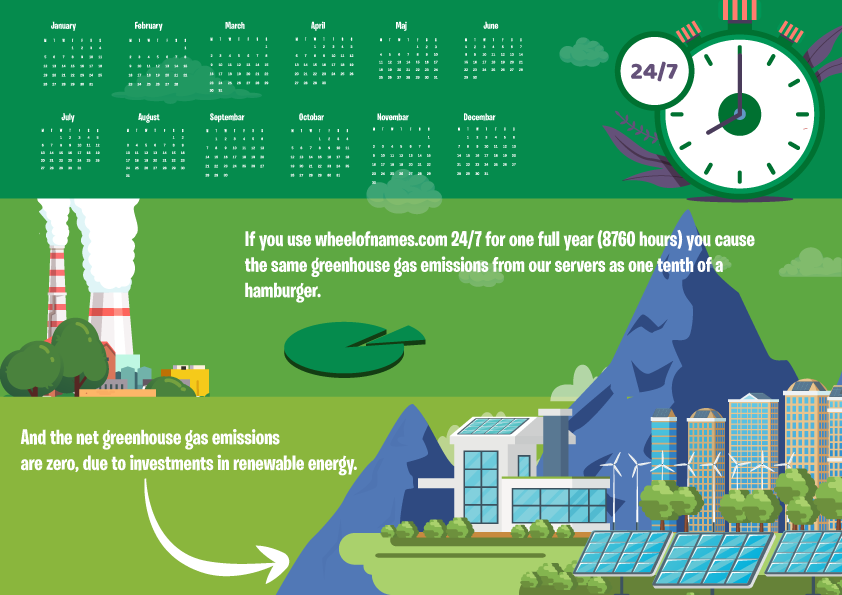
We have designed this website to be as environmentally sustainable as possible. One important choice is where the servers that host the website are and what type of energy is powering them. We have chosen Google’s datacenter in Council Bluffs, Iowa. Google’s datacenters worldwide are carbon neutral, and the Iowa datacenter is powered by 93% carbon-free energy. You can see the other green metrics for that datacenter below.
- 93% carbon-free energy.
- 2x more efficient than typical enterprise datacenters.
- 1.1 Power Usage Effectiveness; 30% better than the industry average of 1.58.
- 90% waste diverted from landfills.

A family of deer have moved in next to the Council Bluffs, Iowa datacenter.
Credits & Licenses
The small crowd applause sound is by Yannick Lemieux, and is licensed under Creative Commons Attribution 3.0.
We rely on open-source packages to help power the app. For a detailed breakdown of these dependencies and their licenses, please see our Third-Party Software Notices.